Difference between revisions of "Parachute"
From Drawn to Life Wiki
| Line 11: | Line 11: | ||
{{Quote|text=Design a parachute to float to safety!|character=Design Prompt}} | {{Quote|text=Design a parachute to float to safety!|character=Design Prompt}} | ||
| − | '''Parachutes''' are creations in ''[[Drawn to Life]]'' used to help | + | '''Parachutes''' are creations in ''[[Drawn to Life]]'' used to help the the [[Hero]] float to safety at the end of the [[Kori Jungle]]. |
The Parachute is controlled using the D-pad and pressing {{Icon|A Button}} or {{Icon|B Button}}. Pushing {{Icon|A Button}} or {{Icon|B Button}} will make the Parachute ascend a little, but not enough to push The Hero back up to the point at which it was used. | The Parachute is controlled using the D-pad and pressing {{Icon|A Button}} or {{Icon|B Button}}. Pushing {{Icon|A Button}} or {{Icon|B Button}} will make the Parachute ascend a little, but not enough to push The Hero back up to the point at which it was used. | ||
| Line 31: | Line 31: | ||
* A green-and-blue parachute can be seen on the World Map. | * A green-and-blue parachute can be seen on the World Map. | ||
* The Hero can only ascend using the Parachute approximately once every five seconds. | * The Hero can only ascend using the Parachute approximately once every five seconds. | ||
| − | |||
=={{Icon|Painting}} Media== | =={{Icon|Painting}} Media== | ||
| + | <center> | ||
<gallery widths="310" position="center" spacing="small" captiontextcolor="#8e8e8e" bordersize="none" bordercolor="transparent" captionalign="center"> | <gallery widths="310" position="center" spacing="small" captiontextcolor="#8e8e8e" bordersize="none" bordercolor="transparent" captionalign="center"> | ||
File:ParachuteDrawingLocation.png|The area where this creation is drawn. | File:ParachuteDrawingLocation.png|The area where this creation is drawn. | ||
File:ParachuteDrawingPrompt.png|The drawing prompt for this creation. | File:ParachuteDrawingPrompt.png|The drawing prompt for this creation. | ||
| − | |||
File:ParachuteHero.png|A hero using the Parachute. | File:ParachuteHero.png|A hero using the Parachute. | ||
File:Gate3Menu.png|The Beach Gate World Map, showing the parachute floating above the ocean. | File:Gate3Menu.png|The Beach Gate World Map, showing the parachute floating above the ocean. | ||
</gallery> | </gallery> | ||
| − | + | </center> | |
| − | + | {{Navbox/Creation|Drawn to Life|Beach Gate|Kori Jungle|Parachute}} | |
| − | {{Navbox/Creation|Drawn to Life | ||
__NOTOC__ | __NOTOC__ | ||
Revision as of 16:41, 22 December 2021
| Parachute | |
| Information | |
|---|---|
| Name | Parachute |
| Use | Allows the player to glide down slowly to collect coins. |
| Creation Type | Level Object |
| Has Preset | No |
| Template Needed | No |
| Created In/After | Kori Jungle |
| Game(s) | 
|

“Design a parachute to float to safety!”
–Design Prompt
Parachutes are creations in Drawn to Life used to help the the Hero float to safety at the end of the Kori Jungle.
The Parachute is controlled using the D-pad and pressing  or
or  . Pushing or will make the Parachute ascend a little, but not enough to push The Hero back up to the point at which it was used.
 Appearance

Due to the Parachute being a creation object and having no pre-drawn preset or guide, the appearance of this object is completely dependent on the player.
They are still confined to the outline provided.
Levels
 Kori Jungle |
Trivia
- The Parachute is created as the replacement for the Jetstream, another creation drawn in the same level.
- A green-and-blue parachute can be seen on the World Map.
- The Hero can only ascend using the Parachute approximately once every five seconds.
 Media
Media

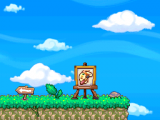
The area where this creation is drawn.

The drawing prompt for this creation.
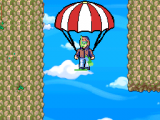
A hero using the Parachute.

The Beach Gate World Map, showing the parachute floating above the ocean.


