Difference between revisions of "Statue (Drawn to Life)"
From Drawn to Life Wiki
| Line 34: | Line 34: | ||
---- | ---- | ||
| − | {{Navbox/Creation|Drawn to Life | + | {{Navbox/Creation|Drawn to Life|Beach Gate|Kori Jungle|Statue (Drawn to Life)}} |
__NOTOC__ | __NOTOC__ | ||
Revision as of 16:05, 18 January 2021
| Statue | |
| Information | |
|---|---|
| Name | Statue |
| Use | Acts as a movable object for buttons |
| Creation Type | Level Object |
| Has Preset | No |
| Template Needed | No |
| Created In/After | Kori Jungle |
| Game(s) | 
|

“Design a statue to push around!”
–Design Prompt
Statues are creations in Drawn to Life. They are first drawn and used in Kori Jungle, and are used throughout the Beach Gate levels. The Hero can push Statues by standing next to one and holding the Y button. The statues will fall on and activate switches that will move platforms that can help The Hero proceed.
 Appearance

Due to the Statue being a creation object and having no pre-drawn preset or guide, the appearance of this object is completely dependent on the player.
They are still confined to a rectangular area.
 Levels
Trivia
- The Statue is the third creation drawn in the level Kori Jungle.
 Media
Media

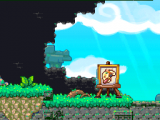
The area where this creation is drawn.

The drawing prompt for this creation.

A player's Statue design.

The dialog box that appears after the Statue is created.


