Difference between revisions of "Rotating Path"
From Drawn to Life Wiki
m |
|||
| Line 37: | Line 37: | ||
</table> | </table> | ||
| − | =={{ | + | == {{IconSVG|Trivia}} Trivia == |
[[File:ComingSoon.png|center]] | [[File:ComingSoon.png|center]] | ||
Revision as of 16:07, 22 June 2022
This Article Contains Non-Canon Content! This page contains content that is not a part of the official canon. Drawn to Life: SpongeBob SquarePants Edition. Non-canon media includes; theories, fan art, speculation, or games published by developers other than 5th Cell or Digital Continue. |
| Rotating Path | |
| Information | |
|---|---|
| Name | Rotating Path |
| Use | A dynamic platform for The Hero |
| Creation Type | Level Object |
| Has Preset | Yes |
| Template Needed | No |
| Created In/After | Balancing Rock Garden |
| Game(s) | 
|


“Draw a Platform that will rotate your path!”
–Draw Prompt
The Flipping Platform is a creation in Drawn to Life: The Next Chapter (Wii) that is drawn in Balancing Rock Garden.
Once drawn, the Rotating Path will remain in one place for a predetermined amount of time. once this time limit is reached, the platform will immediately rotate 90°.
 Appearance

Due to the Rotating Path being a creation object, the appearance of this object is completely dependent on the player.
The preset drawing for this creation is a pair of brown, helicopter blades.
 Levels
 Balancing Rock Garden |
 The Drifting Isles |
 The Maze of Ages |
Trivia

 Media
Media

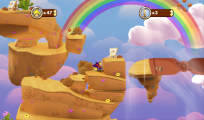
The area where this creation is drawn.

