Difference between revisions of "Action Draw Altar"
(alt) |
|||
| Line 2: | Line 2: | ||
{{Infobox/Creation | {{Infobox/Creation | ||
|image=<tabber> | |image=<tabber> | ||
| − | |-|Drawn Preset=[[File:Altar.png|center]] | + | |-|Drawn Preset=[[File:Altar.png|center|alt=Action Draw Altar preset]] |
| − | |-|Template Page=[[File:DrawingDrawAltar.png|center]] | + | |-|Template Page=[[File:DrawingDrawAltar.png|center|alt=Action Draw Altar template]] |
</tabber> | </tabber> | ||
|name=Action Draw Altar | |name=Action Draw Altar | ||
| Line 31: | Line 31: | ||
=={{Icon|Painting}}Media== | =={{Icon|Painting}}Media== | ||
<gallery widths="310" captionsize="medium" captiontextcolor="#8e8e8e" bordersize="none" bordercolor="transparent" captionalign="center" spacing="small" position="center"> | <gallery widths="310" captionsize="medium" captiontextcolor="#8e8e8e" bordersize="none" bordercolor="transparent" captionalign="center" spacing="small" position="center"> | ||
| − | ActionDrawAltar.png|The dialog box explaining the Action Draw Altar. | + | ActionDrawAltar.png|alt=Prompt: Hero can receive help from the Creator by using the Action Draw Altar. To activate, stand on the altar and press the "A" Button. Once activated, you can draw platforms to help Hero reach new areas.|The dialog box explaining the Action Draw Altar. |
| − | LiveActionDrawingInLevel.png|The pre-drawn Action Draw Altar in a level. | + | LiveActionDrawingInLevel.png|alt=An altar in a level|The pre-drawn Action Draw Altar in a level. |
| − | AltarYellow.png|The color Yellow being made available to the player. | + | AltarYellow.png|alt=Prompt: You can now use yellow! This can be used to reach new heights!|The color Yellow being made available to the player. |
</gallery> | </gallery> | ||
---- | ---- | ||
Revision as of 18:19, 1 July 2022
Not to be confused with Action Drawing or the Village Altars.
| Action Draw Altar | |
| Information | |
|---|---|
| Name | Action Draw Altar |
| Use | Activating Action Drawing |
| Creation Type | Level Object |
| Has Preset | Yes |
| Template Needed | No |
| Created In/After | Baki Basement |
| Game(s) | 
|


–Design Prompt
The Action Draw Altar is a creation in Drawn to Life: The Next Chapter that allows to player to use the Action Draw feature. In order to use Action Drawing, the player must first activate the Action Drawn Altar, which is done by pressing the A button once The Hero is close enough to it. Once activated, the screen will zoom out, the Hero will disappear, and Action Drawing will commence.
The Action Draw Altar is created in Baki Basement on Turtle Rock, and is used frequently throughout the game.
 Appearance

Due to the Action Draw Altar being a creation object, the appearance of this object is completely dependent on the player.
They are, however, still confined to a specific area.
The preset guide for this object appears as an old, decrepit stone shrine with a Raposa head on top and a Nintendo DS stylus in the center.
Trivia
- When the player taps on the Action Draw Altar, a chorus of Raposa will faintly shout the word "draw".
 Media
Media


The dialog box explaining the Action Draw Altar.

The pre-drawn Action Draw Altar in a level.
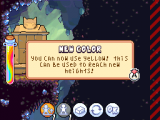
The color Yellow being made available to the player.


