This Article Contains Non-Canon Content! This page contains content that is not a part of the official canon. Drawn to Life: SpongeBob SquarePants Edition. Non-canon media includes; theories, fan art, speculation, or games published by developers other than 5th Cell or Digital Continue. |
| Wings | |
| Information | |
|---|---|
| Name | Wings |
| Use | Allows The Hero to reach higher areas |
| Creation Type | Player Object |
| Has Preset | Yes, 3 |
| Template Needed | No |
| Created In/After | In Sky Arch Mountains |
| Game(s) | 
|


Not to be confused with the DS creation.
–Drawing Prompt
The Wings are a creation in Drawn to Life: The Next Chapter (Wii). They are created during Sky Arch Mountains. It is a required creation that allows the Hero to progress through Eastern Winds.
 AppearanceEdit

Due to the Wings being a creation object, the appearance is overall dependent on the player.
Angel WingsEdit
The Angel Wings take the appearance of a white pair of white wings.
Bat WingsEdit
The Bat Wings take the appearance of a pair of purple wings with a black skeleton.
Parrot WingsEdit
The Parrot Wings take the appearance of a pair of red, purple, and blue wings. The three colors are layered onto the wings.
 LevelsEdit
 Sky Arch Mountains |
 Floating Meadows |
 Roab Plateaus |
 Balancing Rock Garden |
 The Drifting Isles |
 The Maze of Ages |
TriviaEdit

 MediaEdit


The area where this creation is drawn.
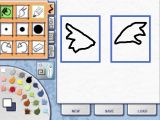
Concept drawing of the Wings.
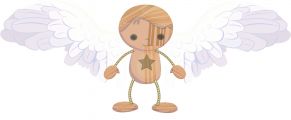
Concept Art of the Hero wearing the Wings.


