Difference between revisions of "Chandelier"
From Drawn to Life Wiki
| Line 30: | Line 30: | ||
=={{Icon|Gallery}} Media== | =={{Icon|Gallery}} Media== | ||
| + | <center> | ||
<gallery orientation="square" position="center" widths="310" spacing="small" bordercolor="transparent" bordersize="small" captiontextcolor="#8e8e8e" captionalign="center" captionposition="below"> | <gallery orientation="square" position="center" widths="310" spacing="small" bordercolor="transparent" bordersize="small" captiontextcolor="#8e8e8e" captionalign="center" captionposition="below"> | ||
File:ChandelierDrawingLocation.png|The area where this creation is drawn. | File:ChandelierDrawingLocation.png|The area where this creation is drawn. | ||
| Line 36: | Line 37: | ||
File:ChandelierHero.png|A hero riding a Chandelier. | File:ChandelierHero.png|A hero riding a Chandelier. | ||
</gallery> | </gallery> | ||
| + | </center> | ||
---- | ---- | ||
Revision as of 04:23, 28 June 2024
| Chandelier | |
| Information | |
|---|---|
| Name | Chandelier |
| Use | A platform the player can swing back and forth using the D-pad |
| Creation Type | N/A |
| Has Preset | No |
| Template Needed | No |
| Created In/After | Rapo Towers |
| Game(s) | 
|

Not to be confused with the SpongeBob Creation.
“Draw a swinging chandelier!”
–Design Prompt
“Use the +Control Pad to swing it back and forth!”
–Info Prompt
Chandeliers are creations in Drawn to Life, first drawn in Rapo Towers.
Chandeliers swing back and forth allowing The Hero to reach higher platforms and move throughout the level. When The Hero jumps onto the chandelier, the D-pad is used to move it back and forth.
 Appearance

Due to the Chandelier being a creation object and having no pre-drawn preset or guide, the appearance of this object is completely dependent on the player.
They are still confined to the outline provided.
 Levels
Trivia
- This is the second creation drawn in Rapo Towers.
 Media
Media


The area where this creation is drawn.

The drawing prompt for this creation.
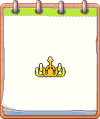
A player's Chandelier design.
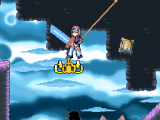
A hero riding a Chandelier.


